
Technical
Posey is an AI-powered personal trainer iOS app with a service-oriented architecture. The iOS app connects to Firebase for auth and Firestore, a Python backend for training plans, and Google Gemini for AI coaching.

Architecture overview
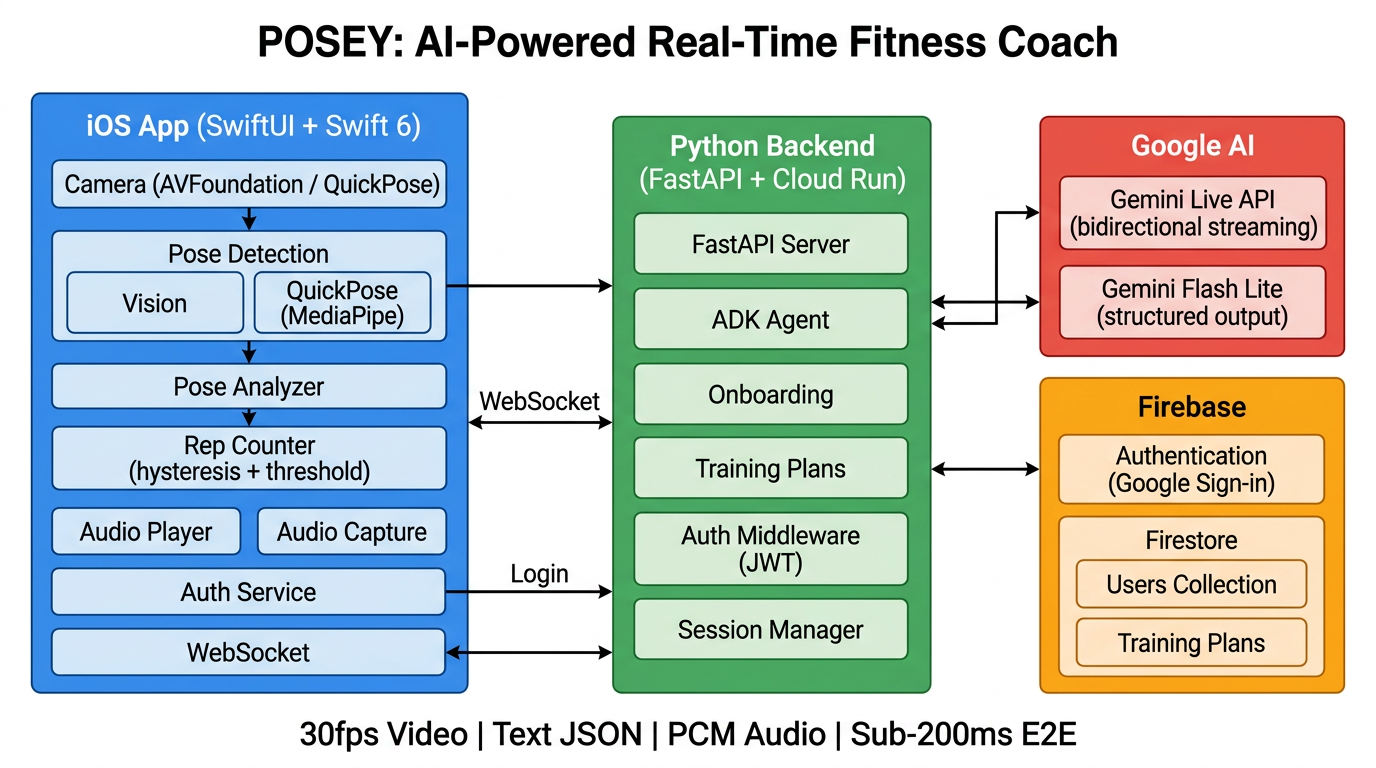
iOS app (SwiftUI)
- Views: ContentView, LoginView, OnboardingView, WorkoutView, ProfileView
- Services: AuthenticationService, WorkoutSessionManager, OnboardingService, TrainingPlanService
- Workout pipeline: Camera (30fps) → Pose detection (QuickPose or Vision) → GeminiCoachService → Audio playback
Firebase
- Authentication (Google Sign-In)
- Firestore (users, training plans)
Python server (FastAPI)
/ws— WebSocket ADK agent/onboarding/next-step— Adaptive Q&A/training-plans— Plan generator
Google Gemini
- Gemini Live API — real-time coaching (vision + voice)
- Gemini Flash Lite — onboarding and training plans
Tech stack
| Layer | Technology |
|---|---|
| Mobile app | Swift 6, SwiftUI |
| Pose detection | QuickPose (MediaPipe BlazePose) or Apple Vision |
| AI coaching | Gemini Live API via Firebase AI Logic SDK |
| Training plans | Gemini Flash Lite via Google ADK |
| Backend | Python, FastAPI, Google Cloud Run |
| Database | Firebase Firestore |
| Auth | Firebase Auth + Google Sign-In |
| Audio | AVAudioEngine (low-latency PCM playback, 24kHz) |
Workout pipeline
- Camera captures 30fps video
- Pose detection extracts 19 body keypoints (QuickPose or Apple Vision)
- PoseAnalyzer calculates joint angles (knee, elbow, hip, shoulder, torso)
- Every 4 seconds: JPEG frame + pose JSON sent to Gemini Live API
- Gemini responds with streaming PCM audio (sub-200ms latency)
- Audio plays through speaker; transcription shows as subtitles
Data & privacy
Pose data and camera frames are processed for coaching. For details on what we collect, how we use it, and your rights, see our Privacy Policy.